Peenie Wallie2008-08-16T03:41:01ZA confused jumble of paranoid ramblings, politically incorrect diatribes, worthless photographs, amateur slideshows, and disturbing videos. Guaranteed to offend the narrow minded and amuse the rest.
tag:www.peeniewallie.com,2008://1Movable TypeCopyright (c) 2008, Rob KiserUpgrading Movable Type 3.2 to 4.22008-08-16T03:41:01Z2008-08-16T00:38:14Ztag:www.peeniewallie.com,2008://1.19362008-08-16T00:38:14ZToday, I'm going to try to upgrade to release 4.2 of Movable Type from 3.2. So the availability of the website may be a bit sketchy, but if it's down, I doubt you'll be reading this - none-the-less. Patience is...Rob Kiserwww.peeniewallie.comrob@wispertel.netTechnical
Today, I'm going to try to upgrade to release 4.2 of Movable Type from 3.2. So the availability of the website may be a bit sketchy, but if it's down, I doubt you'll be reading this - none-the-less. Patience is a virtue. Good things come to those who wait, etc. etc.
First, I'll run another backup of the website because, my backups didn't run last night for some reason. I think that Allie is signing me off when she comes over, which prevents my backups from running. I'll have to discuss this with her at some point, but I digress.
]]>
OK. I ran my backups. So far, so good. Downloaded Movable Type Pro for Bloggers (version 4.2). Unzipped it to a temp folder.
Then, I renamed my old mt and mt-static libraries and created my new ones. (I separated and moved the new mt-static, as I had done previously.) Then, I copied over my old mt-config.cgi, as instructed.
Now, I'm supposed to 'Consult "Additional Upgrade Resources"'. Hmmmm. A hyperlink here would be nice, wouldn't it?
OK. Well, now I've opened up a file that I apparently downloaded with the 4.2 install called Readme.html. It says I need the following:
Perl 5.6.1 or greater;
A web server like Apache, or Windows IIS;
Access to a database like MySQL, SQLite or Postgres;
The following Perl modules:
* DBI
* Image::Size
* CGI::Cookie
OK. Let's see what I have here. I'm running ActivePerl 5.8.6.811, Apache 2.0.63, and MySQL 4.1.10. So, I'm guessing I'm good on all of this so far.
Now, it says the following:
Upgrading Movable Type
If you are upgrading to Movable Type 4 from a previous version, we recommend that you first back up your old installation. Then upload Movable Type 4's files over your old ones. Access Movable Type as you normally do, and you will be taken through the upgrade process.
Not really clear on all this, but basically, they're saying it will do the upgrade for me somehow, apparently. All I have to do is launch mt.cgi, I'm guessing.
But I still haven't located this mysterious "Consult "Additional Upgrade Resources"". Hmmm..
Now, I'm looking in the same place at the Quick Start Instructions. Everything is telling me to just run mt.cgi, apparently.
OK. Finally, I found it. "Additional Upgrade Resources" was just a section further down in the same Movable Type Upgrade. Doh!
OK, So, I launch my old trusty mt.cgi, and it automagically runs a script called mt-upgrade.cgi and says "Time to Upgrade!".
Nice. So, somethings working, anyway.
Time to Upgrade!
A new version of Movable Type has been installed. We'll need to complete a few tasks to update your database.
Information about this upgrade can be found here.(broken link)
In addition, the following Movable Type components require upgrading or installation:
* Professional Pack Version 1.2
* Community Pack Version 1.6
* Widget Manager Upgrade Assistant Version 1.1
I click Begin Upgrade. It wants me to sign in. It puts in my username and password for me. Fair enough.
* Upgrading database from version 3.2001.
* Upgrading table for MT::Entry::Meta records...
* Upgrading table for Job Exit Status records...
* Upgrading table for MT::Asset::Meta records...
* Upgrading table for Asset records...
* Upgrading table for Asset Placement records...
* Upgrading table for MT::Author::Meta records...
* Upgrading table for Tag records...
* Upgrading table for MT::TBPing::Meta records...
* Upgrading table for MT::Category::Meta records...
* Upgrading table for Field records...
* Upgrading table for Job Function records...
* Upgrading table for MT::Template::Meta records...
* Upgrading table for touch records...
* Upgrading table for Role records...
* Upgrading table for Object Score records...
* Upgrading table for Job Error records...
* Upgrading table for Association records...
* Upgrading table for Job records...
* Upgrading table for MT::Blog::Meta records...
* Upgrading table for Tag Placement records...
* Upgrading table for MT::Comment::Meta records...
* Upgrading table for Entry records...
* Upgrading table for Entry records...
* Upgrading table for Archive Mapping records...
* Upgrading table for User records...
* Upgrading table for User records...
* Upgrading table for TrackBack records...
* Upgrading table for Category records...
* Upgrading table for TrackBacks records...
* Upgrading table for TrackBacks records...
* Upgrading table for Template records...
* Upgrading table for Template records...
* Upgrading table for IP Ban records...
* Upgrading table for Permission records...
* Upgrading table for Permission records...
* Upgrading table for fileinfo records...
* Upgrading table for TrackBack records...
* Upgrading table for Blog records...
* Upgrading table for Comment records...
* Upgrading table for Comment records...
* Upgrading table for Contact records...
* Upgrading table for Entry records...
* Upgrading table for Category Placement records...
* Upgrading table for Session records...
* Upgrading table for User records...
* Upgrading table for TrackBack records...
* Upgrading table for Category records...
* Upgrading table for Template records...
* Upgrading table for Permission records...
* Upgrading table for fileinfo records...
* Upgrading table for Comment records...
* Upgrading table for Contact records...
* Creating new template: 'Comment Response'.
* Creating new template: 'Comment Response'.
* Creating new template: 'Userpic'.
* Creating new template: 'Commenter Notify'.
* Creating new template: 'Search'.
* Creating new template: 'New entry notification'.
* Creating new template: 'Registration Form'.
* Creating new template: 'Status Message'.
* Creating new template: 'GlobalJavaScript'.
* Creating new template: 'Footer'.
* Creating new template: 'Profile Error'.
* Creating new template: 'Registration Confirmation'.
* Creating new template: 'Commenter Confirm'.
* Creating new template: 'Login Form'.
* Creating new template: 'Simple Header'.
* Creating new template: 'Form Field'.
* Creating new template: 'Password Reset Form'.
* Creating new template: 'New Comment'.
* Creating new template: 'Profile Edit Form'.
* Creating new template: 'Registration notification'.
* Creating new template: 'Email verification'.
* Creating new template: 'Sign In'.
* Creating new template: 'Profile View'.
* Creating new template: 'New Ping'.
* Creating new template: 'Navigation'.
* Creating new template: 'Comment throttle'.
* Creating new template: 'Password Recovery'.
* Creating new template: 'Profile Feed'.
* Creating new template: 'Simple Footer'.
* Creating new template: 'Subscribe Verify'.
* Creating new template: 'Header'.
* Creating new template: 'Entry Notify'.
* Creating new template: 'Mail Footer'.
* Removing unused template maps... (100%)
* Updating system search template records...
* Classifying category records... (100%)
* Populating default file template for templatemaps... (100%)
* Migrating Nofollow plugin settings...
* Assigning junk status for TrackBacks... (100%)
* Classifying entry records... (100%)
* Updating widget template records... (100%)
* Assigning junk status for comments... (100%)
* Populating authored and published dates for entries... (100%)
* Assigning user status... (100%)
* Merging comment system templates... (100%)
* Assigning basename for categories... (100%)
* Moving metadata storage for categories...
* Moving metadata storage for categories...
* Assigning blog template set... (100%)
* Moving OpenID usernames to external_id fields... (100%)
* Removing unnecessary indexes...
* Assigning user authentication type... (100%)
* Assigning embedded flag to asset placements... (100%)
* Assigning author basename... (100%)
* Assigning blog page layout... (100%)
* Replacing file formats to use CategoryLabel tag... (100%)
* Migrating permissions to roles... (100%)
* Updating template build types... (100%)
* Assigning entry comment and TrackBack counts... (100%)
* Migrating permission records to new structure...
* Migrating role records to new structure...
* Migrating system level permissions to new structure...
* Adding new feature widget to dashboard... (100%)
* Assigning all permissions to blog administrator... (100%)
* Recover permissions of system administrators... (100%)
* Removing Dynamic Site Bootstrapper index template...
* Updating user permissions for editing tags... (100%)
* Migrating any "tag" categories to new tags... (100%)
* Setting new entry defaults for blogs... (100%)
* Database has been upgraded to version 4.0067.
* Plugin 'Professional Pack' installed successfully.
* Plugin 'Community Pack' installed successfully.
Error during upgrade:
Return to Movable Type
So, I click on Return to Movable Type and it brings up what appears to be a slick new movable type home screen.
But the bottom of the screen has a nasty warning that says:
"Movable Type was unable to locate your 'mt-static' directory. Please configure the 'StaticFilePath' configuration setting in your mt-config.cgi file, and create a writable 'support' directory underneath your 'mt-static' directory."
So, I did as I was told. I added the StaticFilePath configuration setting to my mt-config.cgi, and the warning disappeared.
Hmmmm. Maybe the update worked?
I tried to preview my current post in the upgrade, and got an error message:
Publish error: Publish error in template 'Individual Entry Archive': Unknown tag found: TechnoratiTags
So, I clicked on Design - Templates. Then, under Archive Templates - Individual Entry Templates.
Sure enough, right at the top it says the following:
One or more errors were found in this template.
* at line 83 is unrecognized.
* at line 84 is unrecognized.
* at line 1482 is unrecognized.
Hmmmm.OK. Now, I see what the problem is. My plugins are missing. I need to move them from my old mt\plugins folder to the new mt\plugins folder.
I will not copy over mt\plugins\nofollow because they say the plugin is obsolete and I won't copy over mt\plugins\spamlookup because there is already a copy of it in the new install.
OK. I copied those 4 folders over. Now, following the directions for the next folder, I'm not going to copy over the following file because it's obsolete:
mt\php\plugins\init.nofollow.php
But I will copy over the following:
mt\php\plugins\function.MTCommentChallenge.php
OK. That's done. OK. Now I see the step where they tell you not to forget to upgrade/copy your old plugins. They tell you after they tell you to go ahead and run the mt.cgi. Nice. Well, better late than never, right?
If you elected to create a fresh install of Movable Type, remember to re-install each of your plugins - Check to see if there are new versions available for any of the plugins you had installed previously. If a newer version is available, install them.
OK. Now, when I bring up my individual entry template, I don't see the error messages about unrecognized tags.
I click on Manage - Entries and bring up my last post. I click Preview, and the preview works. No errors this time. Maybe it's working?
OK. The upgraded version of MT seems to be working, but it's still very slow. It takes much too long to post entries, comments, etc. I'll see if I can get this to work faster, but this was one of my main goals in upgrading....to get MT to run faster, and I'm not there yet, obviously.
]]>
Ignoring The Olympics2008-08-16T00:29:31Z2008-08-14T18:27:47Ztag:www.peeniewallie.com,2008://1.19352008-08-14T18:27:47Z I'm glad to see I'm not the only one ignoring the olympics. First of all, I don't care about it. Not a whit. To me, the Olympics are less alluring than the state fair. When I did happen to...Rob Kiserwww.peeniewallie.comrob@wispertel.netRobservations
I'm glad to see I'm not the only one ignoring the olympics. First of all, I don't care about it. Not a whit. To me, the Olympics are less alluring than the state fair. When I did happen to skip across it on tv, they were playing Badminton for Christ's sake. Badminton! Like...Lord God that's not a sport, any more than say croquet or horseshoes.
When I lived in Dallas, this shyster came to town promoting how he was going to make croquet into a big, legitimate sport and have competitions played in big arenas with a national audience. He suckered all these businesses into giving him barrels of money and then disappeared and everyone was left standing around saying, "A croquet tournament? How in tarnation did we fall for that? "
I'm not saying whether they play horseshoes or croquet in the Olympics. I don't know if they do or don't and it really doesn't matter. There's nothing any gayer than athletes in training all around the planet for years playing badminton.
Aaron, Cindy, and I were musing on this somewhat last night. They were complaining about the uber-gay synchronized diving marathon and I mentioned that beach volleyball isn't a sport. We decided that any "sport" where most people would normally play with a beer in one hand can't be considered a legitimate sport. Downhill skiing, ok. Fair enough. But ping pong? Come on!
Unfortunately, I'm sure getting the Olympic committee to agree to drop the biathalon, ping pong, and badminton would be next to impossible so then I came up with the alternate idea of having the athletes compete in the raw. "Nude Olympics" would certainly draw a bigger audience, at least for women's volleyball. But then, I went home and discovered that someone else had already thought of the Nude Olympics.
C'est la Vie.
]]>
Books For Kids2008-08-14T18:27:34Z2008-08-14T18:23:38Ztag:www.peeniewallie.com,2008://1.19342008-08-14T18:23:38ZIf you're looking for suggestions of good books for kids, you might want to try checking out the Books For Kids blog....Rob Kiserwww.peeniewallie.comrob@wispertel.netRobservations
If you're looking for suggestions of good books for kids, you might want to try checking out the Books For Kids blog.]]>
Lynne Russell - Bone Ugly2008-08-14T05:12:01Z2008-08-14T04:58:01Ztag:www.peeniewallie.com,2008://1.19332008-08-14T04:58:01Z Lynne Russell used to be an anchorwoman at CNN's Headline News. She was as ugly as homemade sin. I quit watching Headline News because every time I saw her face it made me cringe. I'd forgotten about her until...Rob Kiserwww.peeniewallie.comrob@wispertel.netRobservations
Lynne Russell used to be an anchorwoman at CNN's Headline News. She was as ugly as homemade sin. I quit watching Headline News because every time I saw her face it made me cringe. I'd forgotten about her until I saw this smoking hot chick on CNN today named Robin Meade.
And I was like...thank God they finally axed that old hag. I'd totally repressed her memory until I saw Robin and then her old haggard face came back to me like a bad dream.
I figure that pretty much anyone can read a teleprompter, so I personally, would much rather watch someone hot read the news than some old battle axe.
Where I come from, they'd say Lynne wa's "bone ugly", as in "beauty is only skin deep, but ugly goes to the bone". Ughhh. I'm still shuddering.
]]>
Canon EOS-40D for Astrophotography2008-08-14T04:34:54Z2008-08-14T04:33:03Ztag:www.peeniewallie.com,2008://1.19322008-08-14T04:33:03ZThis dude takes the 40D to the extreme with an trick astrophotography setup....Rob Kiserwww.peeniewallie.comrob@wispertel.netRobservations
This dude takes the 40D to the extreme with an trick astrophotography setup.]]>
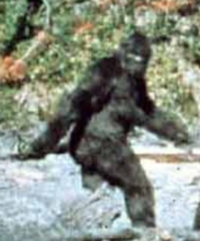
Bigfoot Carcass Recovered in Georgia2008-08-16T00:19:43Z2008-08-13T20:51:21Ztag:www.peeniewallie.com,2008://1.19312008-08-13T20:51:21Z Some rednecks claim to have discovered a Bigfoot carcass in the woods of Northern Georgia. Logically, they then shipped it across the continental United States to the San Francisco Bay peninsula. No one knows crazy like the San Francisco...Rob Kiserwww.peeniewallie.comrob@wispertel.netRobservations
Some rednecks claim to have discovered a Bigfoot carcass in the woods of Northern Georgia. Logically, they then shipped it across the continental United States to the San Francisco Bay peninsula. No one knows crazy like the San Francisco Bay area, right? So, in any event, his body is under wraps but there will be a grand unveiling of the body at a press conference in Palo Alto on Friday. I'm betting it's some viral marketing campaign like the Montauk monster.
]]>
Jon Voight and Glenn Beck on Obama2008-08-13T20:13:21Z2008-08-13T20:02:12Ztag:www.peeniewallie.com,2008://1.19302008-08-13T20:02:12Z In case you missed it, Jon Voight was on Glenn Beck's CNN Headline News show last night. He outs Obama for being a Marxist and skewers Hollywood for going along with it hook, line, and sinker. Transcript in the...Rob Kiserwww.peeniewallie.comrob@wispertel.netRobservations
In case you missed it, Jon Voight was on Glenn Beck's CNN Headline News show last night. He outs Obama for being a Marxist and skewers Hollywood for going along with it hook, line, and sinker.
GLENN BECK, HOST (voice-over): Tonight, the Georgia/Russia crisis continues. Is the evil empire back in business? You bet.
Plus, actor Jon Voigt tells me what it`s like to be the lone conservative voice in the liberal wasteland that is Hollywood. Is there a new kind of black listing and McCarthy era? And this time it originates from Hollywood? You bet. And his thoughts on the election, the fighting in Georgia, and so much more.
And country superstar himself John Rich stops by to tell me why John McCain should be the man who leads this country. He`s going to have to be pretty convincing.
All this and more, tonight.
(END VIDEOTAPE)
BECK: Well, hello, America. This morning, if you listened to the radio program, I told you we would have the president of Georgia on the program. This is the "New York Times" today. That`s him underneath a bunch of flack jackets, being protected, as Russia is targeting him and his country. Because war is a tricky business, at the last minute, he couldn`t make it. We hope that he is well, and we understand and we hope to have him on the program tomorrow or in the next few days.
In the meantime, let me give you an update. Russia says they have halted the military activity in Georgia. That seems to be news to a lot of Georgians, who say, "I`m still getting shot by the Russian army" However, it does look like Russian aggression is starting to slow down, at least, for now. So here is "The Point" tonight.
The evil empire is back, and it is back with a vengeance, with a message to the entire world. And here`s how where got here.
If there`s ever been any doubt that Russian Prime Minister Vladimir Putin was still in complete control of his country -- you know, I think maybe his presence on the Georgian border, directing the military operations should have cleared that whole thing up. Make no mistake about it: no matter whose office door says "president, Russia`s iron fist belongs to one man, and it is former KGB man Vladimir Putin.
After a two-decade nap, both over in Russia and, quite honestly, here, Russia is back and in better financial and military shape than ever before. We thought we won the Cold War. I don`t think we did, now looking back on it.
President Bush says he`s looked into Putin`s eyes and saw sunshine and happiness and Bambi talking to little -- the little skunk. He said he saw a true friend in there.
Truth is, Russia has been quietly rebuilding itself in the KGB way, bigger, stronger than ever before, to the point to where now John McCain says when he looks in Putin`s eyes, he sees the three letters, K-G-B. And you know what? He`s right.
OK. Here`s what you need to know. This time around, Russia`s strength lies not in its past nukes, but in its present oil and gas. Over the last five days, they have brought Georgia to its knees. The violence also forced British Petroleum to close half of its pipeline in the region, and mark my words. This Russian war game was a signal to America, to NATO, to Georgia and its allies and the west.
Russia is wide awake and they are looking to control the world`s energy supplies, and once they do that, they will control the world.
Dimitry Sidorov is a D.C. bureau chief of a Russian business newspaper, Commersant (ph), and Ilan Greenberg is the journalist that covered President Saakashvili for the "New York Times."
Ilan, let me start with you because we were supposed to have the president on tonight. You actually call President Saakashvili, the Reagan of the former Soviet Union. Why?
ILAN GREENBERG, "NEW YORK TIMES": Well, that`s a loose analogy. But Saakashvili, when he took power in 2004, after the Rose Revolution, he really imbued the country for the first time with a sense of hope that things could move forward.
He had a platform that was targeting corruption and, to a great extent, was able -- was able to get at corruption in the country. He was able to increase foreign investment into the country, stabilize the economy, and -- and encourage a democratic culture in the country. And so, to oversimplify things, there was morning in Georgia.
BECK: OK. Dimitry, let me go to you. Most Americans don`t even have any idea what this -- I mean, they don`t even know where this country even is. I mean, I don`t, really. Didn`t know what this story was all about.
And I have been following Georgia for the last couple of years and what`s going on with the new petro state of Russia. Explain this as simply as you can to Americans, what this -- what the message really is that Russia is trying to send?
DIMITRY SIDOROV, D.C. BUREAU CHIEF: I think the message that Russia is sending is they -- they really want to control the Caucuses they lost in the `90s, and they want to control not only the region itself but basically the pipelines. You mentioned BP pipelines. I should mention also the Bakku and Chehan (ph) pipelines, and then -- I`m sorry.
And then it`s sending a clear message to the neighboring countries such as, for example, Azerbaijan, an oil-rich country, as well as to Ukraine, that annoys Russia pretty much, and other CIS neighbors.
BECK: Let me -- let me ask you this, Dimitry. Do you think that -- first of all, you`re a newspaper guy from Russia. Are you ever worried about breaking out with a case of hair falling out? I mean, they tend to kill people that speak their mind against Russia. I mean, has that ever bothered you, being a newspaperman from Russia?
SIDOROV: Well, not that much. The only concern is my parents. They live over there, but otherwise, no.
BECK: OK. Let me -- let me take you -- let me take you to the other message that I think that Russia may be sending. And that`s not only to NATO, basically saying, "You`ve got nothing on us. You`re not going to be able to bully us around."
More importantly, do you think they`re trying to send a message to the new allies of Cuba and Venezuela and Iran and Libya and China and saying, "Don`t worry, guys. We`re not afraid of America. We`ll take them on"?
Are they trying to send that message, as well?
SIDOROV: I think they`re trying, rather, to send a message to the west. They`re trying to send a message to the CIS countries, and they got -- they were well prepared to send this message because the U.S. is busy with Iraq. The Europeans are supplied by the Russians, and I think the Russia -- Russia supplies close to 40 percent of gas to Europe.
And basically, there`s another very important issue, Iran, and there will be discussions in regard to the tougher sanctions on Iran in the U.S. and U.N. Security Council. So in a way, it was a right moment for the Russians to step in. And I was really -- I was not surprised with the U.S. and the European response.
BECK: Yes. Ilan, this has been coming for a while. And Barack Obama, I mean, he had it wrong on day one. Now he`s finally, you know, saying the things that he should have been saying the whole time.
This has been coming for long time. Most of the world didn`t even pay attention to it. I don`t mean shlubs like me; I mean -- I mean world leaders didn`t see this one coming, even though it was very obvious. Agree or disagree?
GREENBERG: I agree completely. It`s hard to make the case that Georgia has been getting the attention it needed over the last few years. Otherwise, what we`ve seen over the past few days surely wouldn`t have happened.
Georgia, whether it`s been getting good advice or bad advice, apparently hasn`t been getting enough advice. The -- Georgia was -- applied for NATO membership, was turned down recently and was, to some extent, set up for a fall.
BECK: That was really -- that was really the critical moment, when we said, hey, we invited them in for NATO membership, and Putin saw at that point, "Oh, my gosh. They`re not all behind Georgia." That`s when he really -- that`s when he saw his golden opportunity of, "Oh, I can mess with these guys."
GREENBERG: Yes, perhaps. You know, it`s hard -- it`s hard to underestimate how much Putin hates Saakashvili. You know, his animus toward President Saakashvili is pretty visceral and well-documented.
BECK: Yes.
GREENBERG: You know, and when we were speaking before about messages Russia wants to send, we shouldn`t overlook the message they want to send specifically to Russia.
BECK: Oh, yes. Yes.
GREENBERG: It`s a very emotional issue.
BECK: That`s why I said at the very beginning I don`t think this thing is over when they say the hostilities are over. It will be over when the president of Georgia is dead, unfortunately, I believe.
One last question, Dimitry. Russian peacekeepers are probably going to be a part of this deal inside the boarders of Georgia. Wouldn`t that be a little like Mexican peacekeepers being stationed in Los Angeles?
SIDOROV: I don`t think that the presence of the Russian peacekeepers is acceptable. I think -- I think rather the compromise would be if the European police forces will end up there because the Russians will never agree to the U.S. presence.
BECK: OK, thank you very much, gentlemen. I appreciate it.
We`ll be coming back with John McCain. He offers tough talk on Russia.
Meanwhile, Obama is -- I don`t know where he is, except now he`s with John McCain. Is John McCain overplaying his national security hand, or is this exactly the attitude that we need from the next administration?
Plus, it looks like conservative actor John Voigt has caught a bad case of cold shoulder. Did his negative remarks about Barack Obama being a Marxist get him black-balled behind the scenes in Hollywood? We`ll ask him in tonight`s "Real Story."
(COMMERCIAL BREAK)
(BEGIN VIDEO CLIP)
BECK: The thing that you really have to understand about Georgia, I think, is that this is really all about sending messages. That`s what this is about.
The first message is the one we`re supposed to receive, the west, but in particular, America, that Russia is back in military terms. It`s no longer going to tolerate, you know, its former satellite countries joining NATO or housing antiballistic radar or missiles.
Putin is telling, "The west back down with NATO. Back down with your economic expansion programs. We are not to be kicked around any more."
(END VIDEO CLIP)
BECK: Coming up, I don`t know about you, can you even imagine what it`s like to be a conservative in Hollywood? I mean, I walk down the streets here in New York. I can feel the hot breath of the liberals right on the back of my neck. It`s pretty spooky.
Jon Voigt, I would imagine the dirty looks and the hot breath would be the easy part, living there in Hollywood. Apparently, the Oscar-winning actor has been blacklisted now for speaking his mind. He`ll join me in tonight`s "Real Story" to explain.
But first, while pockets of fighting continue today, Russia has called for an end of their military operations in Georgia. Mm-hmm, I trust them.
It`s great news for Georgians, but I think the entire purpose of this conflict was to send a message to America and the west. We just talked about it in that radio bump there you just saw. We have a couple of choices here. I don`t -- I don`t know what the right choice is. Is there a right choice on how to deal with Russia in this?
Jonathan Allen, he is a reporter for the "Congressional Quarterly."
Jonathan, first of all, let me just say this: this has been a good week for John McCain, because he`s had this one nailed since Friday.
JONATHAN ALLEN, "CONGRESSIONAL QUARTERLY": That`s right. On Friday morning when this news first broke, John McCain came out and had a real harsh condemnation for the Russians, basically said they were the aggressors here, that they needed to get out, that the international community needed to call on them to get out.
What we saw from Senator Obama and actually from the White House, as well, was a more measured approach that really sought to put blame on both sides. Since that time, we`ve seen the White House and Senator Obama move more in John McCain`s direction. And now, at this point, it`s hard -- hard to see the big difference between Senator Obama and Senator McCain.
BECK: You know, I have to tell you, John. The interesting thing on this to me is that, I mean, name the time that Obama, especially when it comes to foreign policy, has been consistent. He always says one thing, and then he continues to drift. Where John McCain came in and said, "This is who the aggressor is. These are the bad guys."
And I mean, you know, Obama always says, "Oh, look it. Look, McCain, it`s like another term of George Bush." In this particular scenario, Obama looks like a third term of George W. Bush.
ALLEN: Well, Glenn, without sounding like a campaign spokesman for Obama, he`s been pretty consistent on his timeline for withdrawal from Iraq, that 16-month figure that he`s talked about. So there certainly is a place where he`s been consistent on foreign policy.
BECK: You`ve got to...
ALLEN: however, your point is well made...
BECK: Yes.
ALLEN: ... that there really was a window of difference here between McCain and the Bush White House on this particular foreign policy issue, where it looked like McCain really had a lot more familiarity with the issue or certainly, maybe, a better sense of where it was heading over the weekend.
BECK: It`s my understanding that, and I don`t have this confirmed. I have several sources on it who have told this, but that we scrambled jets on Friday up to Alaska.
When the United States is scrambling jets because we`re worried about Russia, that makes the guy with little foreign policy experience kind of look like, ooh, maybe not.
Do you think any kind of affect of this, if it settles down, would last for John McCain, or is this just a, you know, a blip that people go, "Oh, wow, wait a minute. We should have somebody with experience in this particular field," and then it`s over and we forget about it?
ALLEN: Right now, it`s a minor issue in a part of the world that most Americans don`t understand, especially compared to gas prices and health care and even the Iraq war.
I think Senator McCain would like to make it a bigger issue. If this is something that Americans are focused on, concentrated on, I think he`s got a strong advantage on it. I think he would have liked to have seen this happen, if it was going to happen, maybe a little closer to the election. I know that`s kind of a terrible thing to say about war, but from a political standpoint, this happening in August and not happening in October...
BECK: Yes.
ALLEN: ... means that by the time the election happened, it probably will be off the plate.
BECK: It was also interesting to me -- do you know anything about John McCain`s relationship with the president of Georgia? He seems to -- I mean, he knew him, he knew him while he was going to college here at Columbia University, which I won`t hold against him. He -- he seemed to have some -- he seemed to have a handle on this one quickly and in a personal way.
ALLEN: Yes. I mean, John McCain has been -- been over to Georgia several times. He talks with a lot of experience about the country, about the situation over there, and clearly, obviously, knows Saakashvili, if I`m pronouncing that right. If I`m not, I`m one of the many people who is mispronouncing it. But he clearly has a lot of familiarity with this particular part of the world and this particular leader.
BECK: With Obama on vacation, is that a good thing for Obama to be kind of out of the spotlight, especially with the John Edwards thing that broke last week. Between John Edwards and this, is it a good thing or a bad thing that he`s kind of away?
ALLEN: I think it`s probably a necessary thing. You know, Senator Obama has been campaigning for well over a year now. I can`t imagine anybody keeping up that schedule. Obviously, no matter when you leave, something is going to happen. Sometimes it will be a world event. In the case of John Edwards, I`m sure he was happy not to be giving press conferences.
BECK: Are you -- wait a minute. Are you a member of the press that`s actually saying that the young man needs to sit it out while the old man continues to go on the campaign trail?
ALLEN: All I`m suggesting, Glenn, is that this is -- we don`t give them enough credit for their endurance.
BECK: All right. Thanks a lot. Appreciate it, Jon.
Coming up, solar energy. Cheap, we have plenty of it. Right? I mean, that big, flaming orb up in the sky. The problem is the storage. Now that may have been solved by a group of Americans at MIT. We`ll find out after the break.
And later, Oscar-winning actor, fellow conservative John Voigt. Few less friends in Hollywood. Is he facing a modern-day blacklist? McCarthy era had nothing on Hollywood today. We`ll ask him. Tonight`s "Real Story" coming up.
(COMMERCIAL BREAK)
BECK: The science is settled. Experts agree that just one hour of sunlight hits the earth, enough to provide the earth`s energy needs for one year. Wow. Why aren`t we using solar energy? The problem with solar energy has never been the supply. It is the storage of all of that potential energy. But here`s some good news. Scientists may finally have found a solution and leave it to the Americans.
Researchers at MIT say they have made a breakthrough that could solve the storage problem and take solar power from an alternative energy to a mainstream source of energy.
Dan Nocera, he is the Henry Dreyfuss (ph) professor of energy at MIT and a researcher on the project. Daniel, this is -- this is pretty groundbreaking stuff. How exactly does it work?
DAN NOCERA, PROFESSOR OF ENERGY, MIT: The way it works is you take photovoltaics, and they take sunlight and change it into electricity. You can feed it to this new compound we made, and then it splits water to hydrogen and oxygen.
BECK: So this is basically -- this basically makes hydrogen power?
NOCERA: Yes. It makes hydrogen power, and then you can put it downstairs, use it when you want.
BECK: OK. And how long can you store it? For as long as you want?
NOCERA: Yes, as long as you want. When the sun is out, you use the electricity and that powers into the catalyst. But once you store it, it`s in the tank and use it when you need it.
BECK: If we -- if we all had hydrogen cars, I could go home and just plug in my car, as well, fill it -- fill it up with hydrogen.
NOCERA: Might want to do that or you might want to feed it to a fuel cell because fuel cells take oxygen and generate electricity. So when the sun goes down, you power your house and recharge that battery in the electric car.
BECK: How much is this going to cost?
NOCERA: Well, that`s a good question. I mean, these are basic science discoveries right now. But this is as simple as simple can be. You just need a glass of water, some earth-abundant materials, phosphate and cobalt, and you`re ready to go.
So in terms of the catalyst part, it`s really cheap, but we still have the photovoltaics, the fuel cells. So in total integrated design, it`s going to have a lot of engineering still to do.
BECK: I lost you at the phosphate. Where did I put my phosphate? But the -- you say that in eight years, that this is possible, that everybody has one of these things on their house, et cetera, et cetera.
My question is, who`s -- who`s helping you on this? Is there anybody that is -- I mean, I don`t -- this story, I think, broke last week. I haven`t seen anybody on this story yet. I haven`t seen Congress. I haven`t seen Al Gore. I haven`t seen RFK Jr. I haven`t seen, you know, Barack Obama or John McCain, anybody saying, "This is it."
NOCERA: Yes, well look, there -- a lot of them know that solar has got to be it. And I have heard that. These are science discoveries that then have to get translated into technologies. And there, the commercial market really will drive it.
And look, if you have something cheap and easy to use, there`s a lot of money to be made. So these -- the commercial market will drive it, and I`ve talked to lots of companies with some great technologies.
BECK: OK. Real quick, Ray Curswell (ph) says that he`s working on nanobot technology with the Google people for he says that he`ll change in five years, he`ll change everything. The paradigm will switch on solar energy, as well. How do we know which one we should be pursuing here?
NOCERA: Well, that`s where I really think the commercial market is going to drive it. It`s going to be technology issues. What I have, it turns out it interfaces with a number of big companies. What they do is used to make hydrogen in a big way. This allows them to do it in a small way.
BECK: Great. Daniel, thanks. Back in a second with "The Real Story." Stick around.
(COMMERCIAL BREAK)
ANNOUNCER: We interrupt tonight`s regularly scheduled the "Real Story" segment to bring you a special message from State.
GLENN BECK, ANCHOR: Comrades, tonight, I bring you sad, sad news from our western front. No, no. Not the one in Georgia. No, no, the real western front, the one in the United States. I`m sad to report that we have lost another great foot soldier in our war on American ideals in culture.
No, no, not John Edwards. He was pretty much useless anyway. I`m talking about the Oscar-winning actor Jon Voight. This former Soviet patriot, this now, trader has revealed all our classified plans to the plans to the American slime riding in the disgusting propaganda rag of the "Washington Times."
Trader Voight revealed that electing Obama would result in quote, "A socialist era that America has not seen before, that would weaken their country in every way."
Oh how true it is. Comrades, you and I both know that Comrade Obama, the things he talks about like universal health care, free college tuition, free child care, universal pre-school, universal national service, universal 401ks, you know those things, would definitely weaken America. But why would our former brother in arms, Jon Voight, betray us by advertising them?
Comrades, if we lose the hearts and minds of our foot soldiers in Hollywood, what`s next? Do we lose, Broadway, the universities, the media? This has got to stop.
We have the traitor here himself, Mr. Jon Voight.
Sir, guilty as charged?
JON VOIGHT, ACTOR: I am guilty, comrade.
BECK: Yes, you are.
VOIGHT: I am guilty.
BECK: I got to tell you, Jon, I am amazed at the story and the vitriol that has come out at you for writing that Obama is going to bring Marxist policies or use Marxist propaganda to bring us into a socialist stage. It`s almost like in Hollywood the reverse McCarthy age is going on, that you`re blacklisted if you`re not a Marxist.
VOIGHT: Yes. Well, I have a little familiarity with the tactics and stuff, but I am really shocked at this kind of behavior. Obviously, it`s very pernicious, it`s very anti-American that you have strong opinions that are well thought out, I think, and I think entirely true, of course. But stating my case brings on, you know, attacks against my person and the threat of taking work away from me.
BECK: You know, I find it amazing, Jon, that they didn`t -- they didn`t argue, but this is the way the left is now. They don`t argue the issues.
They went right for an attack on you with your family. They went right for an attack on you and your intelligence, and then they said somebody -- who after they accused you of having no intelligence -- as smart as you, should know that you can`t speak out if you`re a conservative in a liberal town in a liberal business and be able to have jobs.
What is that? What kind of America is that?
VOIGHT: Yes, and the statement that I just felt as Jeff Wells he said something about doesn`t he have any sense of expediency in a town that`s full of left-thinking people. And it`s quite shocking that people would recommend some behavior not out of principle but out of expediency.
But when you see that the way certain things are going in the Democratic campaign here, you can see that their focus is really on expediency. That`s where the decisions are made.
BECK: You and I spoke earlier today on my radio program, and you know, I like a guy who has a pivot point in their life. I like a guy who is not -- you know, I don`t mind flip-floppers as long as they can tell me why they changed their mind and when they changed their mind.
You actually must be extraordinarily frustrated with the college students and the young crowd and young Hollywood because you were part of that in the `60s and you were caught up in this Marxist movement back in the 1960s.
VOIGHT: Well, I know how it functions, anyway. And Ho Chi Minh was right when he said we weren`t going to win this with bullets and bombs. We`re going to win it in the streets of American and the colleges and schools. And he was right unfortunately, and not much has changed.
THE people who were in the streets are now in the schools teaching our children. So we have a lot to address here. In the safety of -- to they think of the safety of our kids, we`ve got to be very careful right now.
BECK: I have to tell you, John, and this is awful, awful, awful to say --
VOIGHT: Maybe I should say we shouldn`t be careful right now. We should be a little braver and know what the threat is and stand up and face it, you know face it down.
BECK: I have to tell you, when I first read your editorial last week, I thought the first phrase that came to mind was a Son of the Republic. Somebody who understands the Republic and somebody who, like the original Sons of the Republic, like the original founding fathers, they knew that they were signing their own death warrants.
I mean, Benjamin Franklin, they didn`t think that they could actually do the Declaration of Independence until merchants came to him and said, you know what Ben, we know this is going to hurt our business. We know -- I may die penniless, but it`s the right thing to do.
And that`s the attitude that people used to have. And you demonstrated last week that you`ve got -- it doesn`t matter. You`ve got to stand up for what you believe in.
VOIGHT: Oh it`s really -- it`s so important right at this moment in time. And most of what I wanted to do was expose the fact that nobody knows who this fellow is who is running for president. No one cares to look into his background. He`s not vetted in any way.
If he was running for a lesser Office, if he was putting himself in position for a lesser Office, he would be thoroughly vetted out and would be found wanting because after all, he has really no qualifications.
BECK: Yes.
VOIGHT: But running for president, he can hide all of the background. Now, when I -- when you ask people who are enthusiastic about Obama what they know about him, they have very, very little to say.
And they`re going on his looks, the way he carries himself, this idea of change, which by the way, is, if you look at change, the word change is very key to the Marxist organizers.
What they do is they dismantle the system that they`re focusing on and they bring in change. And he studied the style of Sol Ilinsky in Chicago, who was a Marxist organizer, and he`s been a teacher of that method, too. And so he knows exactly what he`s going to do.
What is he going to change? When people said, "I want change." And so what is he going to change? Is he going to change America from what we love? From what we -- from the freedoms we have, from the independence, from the economic opportunities that we offer to people? Yes, he`s going to change that.
BECK: His wife said at one point, one of my favorite quotes from his wife, she said, "My husband will not allow you to go back to sleep. My husband will not allow you to be uninvolved in America." And I thought, ok, I want to be involved in America, but I don`t want to force anybody to be in. That is un-American in of itself.
Let me ask you this, the Democratic Party, I said this four years ago when I was also warning the Republicans that they were losing their soul and they needed to find what they really stood for and not just you know try to appease everybody. I said it at the same time, the Democrats are getting into bed with Marxists and they don`t know who they`re getting into bed with.
They have still not done anything about that. And now, at the convention with Barack Obama, one of the performers is Kanye West, who is the guy who came out and said Bush hates black people. The military is killing blacks in New Orleans. I mean, where does this platform of hate come from?
VOIGHT: Well, listen, it`s a mixture of quite a lot of things, but it`s not good. It doesn`t bode well.
You know, it`s very interesting about this idea of the racial stuff, that they try to pin on the Republicans and on John McCain. And you have this little mantra. He is very clever, Obama, at speaking, of course and he knows how to get people`s attention, and he say, he has this little mantra.
He says, they`re going to tell you a lot of things about me. They`re going to say I`m risky. They`re going to say I`m not patriotic. They`re going to say I have a funny name. They`re going to say I don`t look like the fellows on the dollar bills.
Well, and he had a little bit of an adjustment from the prior time that he used the same mantra where he said -- he said they`re going to say, oh, by the way, do you know he`s black? Well, they`re suggesting, you know, they`re trying to take things off the table. They`re also implying that the Republicans are using a racial charge against them.
BECK: What I find interesting is --
VOIGHT: And it`s very covert and --
BECK: Yes. It`s always them. Jon, thank you very much. We`ll talk to you again soon, my friend.
VOIGHT: Ok.
]]>
Bud's Bluebirds2008-08-13T17:44:49Z2008-08-13T17:41:55Ztag:www.peeniewallie.com,2008://1.19292008-08-13T17:41:55ZI checked on Bud's bluebirds today. I checked them a little more closely to make sure that they are, in fact bluebirds. They're still in there, but I think that they'll fledge any day now....Rob Kiserwww.peeniewallie.comrob@wispertel.netRobservations
I checked on Bud's bluebirds today. I checked them a little more closely to make sure that they are, in fact bluebirds. They're still in there, but I think that they'll fledge any day now. ]]>
Perseid Meteor Shower2008-08-13T20:16:47Z2008-08-13T05:19:34Ztag:www.peeniewallie.com,2008://1.19282008-08-13T05:19:34Z Last night was the peak of the Perseid Meteor Shower. I set up my Canon EOS 40D on a tripod with the Sony laptop driving the camera via a USB cable. I programmed it to take a 30 second...Rob Kiserwww.peeniewallie.comrob@wispertel.netRobservations
Last night was the peak of the Perseid Meteor Shower. I set up my Canon EOS 40D on a tripod with the Sony laptop driving the camera via a USB cable. I programmed it to take a 30 second exposure at 35 second intervals with ISO set to 1000 and the aperture wide open (f/4.0). I had the camera transfer the image to the laptop via USB. I ran an extension cord out into the yard to power the laptop, and for the camera, I just used a battery grip that doubles the number of batteries in the frame.
Then, I shared the laptop files over my wireless LAN and monitored the results from inside the house. I know. I'm a geek. Can't help myself.
Then, I set my alarm clock for 5:30 a.m. and went to sleep, praying that it wouldn't rain. I got up at 5:30 and broke everything down. Tonight, I looked at my images, and I did, in fact, manage to snap a few shots of meteors.
I used a program called JPGVideo to convert the .jpg images into a video. However, some of the deep sky photos seemed somewhat underexposed, so I created an action to increase the brightness and contrast on some of the images using Adobe Photoshop CS3 in batch mode. Here's a Photoshop Batch tutorial I found useful. Finally, I used Windows Movie Maker to merge the .avi files and add the Pink Floyd soundtrack.
If, for some reason, you can't get the YouTube version to play, or if you just want to see a higher resolution video than the one on YouTube, try this (10 megs).
]]>
The Choke Cherries are Ripe :)2008-08-12T03:06:10Z2008-08-11T23:56:55Ztag:www.peeniewallie.com,2008://1.19262008-08-11T23:56:55Z When the choke cherries are ripe, the mule deer show up. I was down there today with my crow call when I spied this one. He's gorging himself in preparation for mating season, and then the long winter ahead....Rob Kiserwww.peeniewallie.comrob@wispertel.net
When the choke cherries are ripe, the mule deer show up. I was down there today with my crow call when I spied this one. He's gorging himself in preparation for mating season, and then the long winter ahead. The photos I shot aren't great because he's hunkered down in the thick stuff, and I can't run him out, even with my ATV. I got very close to him, so close that I was afraid he'd charge me. Finally, I decided to leave him be, as I've been charged before, and it's not fun.
More photos in the extended entry. Click on images to enlarge.
]]>
]]>
Jonathan's Dolphin2008-08-16T00:16:57Z2008-08-11T20:13:38Ztag:www.peeniewallie.com,2008://1.19252008-08-11T20:13:38Z My brother just got back from a trip to the Bahamas with sister and her family. Here's a video of him landing a stud bull dolphin which is a quite a beast. Not sure who was on the gaff,...Rob Kiserwww.peeniewallie.comrob@wispertel.netRobservations
My brother just got back from a trip to the Bahamas with sister and her family. Here's a video of him landing a stud bull dolphin which is a quite a beast. Not sure who was on the gaff, but they did a good job of getting a large fish in the boat. Believe you me, when a big fish gets up to the boat, a lot of bad things can happen. I've seen a man's leg after a gaff went through it, and when a big fish spits a hook, there's usually a lot of eyes and faces around.
Update: Apparently, it was Steve's cousin Bobby on the gaff. Jonathan was grumbling that Bobby double-gaffed it, but my thought is that Bobby got it in the boat, and that was a large fish. I'm not sure I'd want to be shoving a steel hook into the side of a 52 pound fish and then have to lift it 3 feet into the air to get it into the boat. I say 'Well done, crew. Good show!'
]]>
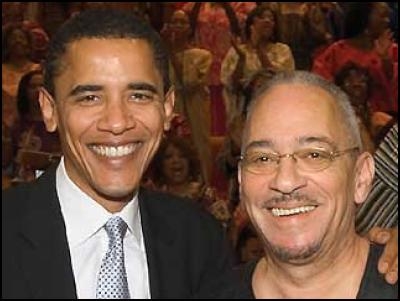
Obama Announces Choice for VP2008-08-11T09:33:05Z2008-08-11T09:26:40Ztag:www.peeniewallie.com,2008://1.19242008-08-11T09:26:40Z Breaking news....you read it on Peenie Wallie first....Obama has chosen Reverend Jeremiah Wright as his Vice-presidential candidate....Rob Kiserwww.peeniewallie.comrob@wispertel.netRobservations
Breaking news....you read it on Peenie Wallie first....Obama has chosen Reverend Jeremiah Wright as his Vice-presidential candidate.
]]>
Obama Channels McCain2008-08-16T00:27:54Z2008-08-10T18:34:26Ztag:www.peeniewallie.com,2008://1.19232008-08-10T18:34:26Z Although Obama initially went with the can't we all just get along Demo-liberal drivel, apparently he heard what McCain said and decided to play follow-the-leader. Now, he's condemning Russia and supporting Georgia, our ally. To be fair to Obama,...Rob Kiserwww.peeniewallie.comrob@wispertel.netRobservations
Although Obama initially went with the can't we all just get along Demo-liberal drivel, apparently he heard what McCain said and decided to play follow-the-leader. Now, he's condemning Russia and supporting Georgia, our ally. To be fair to Obama, it's hard to be overly concerned about world affairs when you're hanging out on Kailua Beach on Oahu.
After his gloomy depiction of America, maybe he he should stay there and let someone competent run the country. ;)
]]>
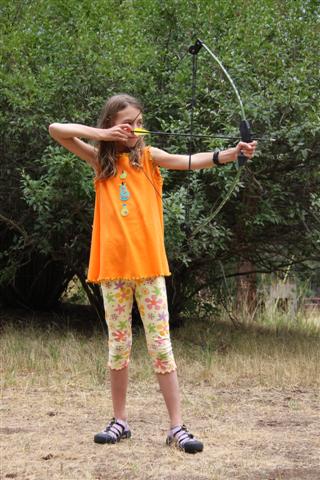
Diana - Roman Goddess of the Hunt2008-08-16T00:22:05Z2008-08-10T03:26:01Ztag:www.peeniewallie.com,2008://1.19222008-08-10T03:26:01Z Here's Jennifer with a bow and arrow she got one Christmas. She hasn't played with it much, but apparently they shot a bow and arrow at horse camp, so she had some renewed interest in the thing. The bow...Rob Kiserwww.peeniewallie.comrob@wispertel.netRobservations
Here's Jennifer with a bow and arrow she got one Christmas. She hasn't played with it much, but apparently they shot a bow and arrow at horse camp, so she had some renewed interest in the thing. The bow she's shooting is a Barnett Lil' Banshee 32" compound bow with a 21" draw and a draw weight of 18 lbs. The arrows are 26" fiberglass practice arrows with plastic fletching. Unfortunately, she needs some new arrows, so I may order these for her.
.jpg)
.jpg)


.JPG "bullseye")